Set-up guide
Connect Motion Turn to Claude.
It takes about two minutes. You need your private connector link: it is on the page you saw after signing up, in the email we sent you, and in your dashboard.
Before you start
- A paid Claude plan (Pro, Max, Team or Enterprise). It is paid to Anthropic, separately from Motion Turn.
- Claude Opus 5.5 or newer, with effort set to high. Motion Turn checks this and will not run on smaller models.
- Your connector link, which starts with
https://motionturn.com/mcp/. It works like a password: share it only with your own team.
Set up Motion Turn in Claude
This takes about two minutes and you only do it once. The pictures show exactly where to click in Claude. Works on claude.ai and the Claude desktop app, on free trial or a paid Motion Turn plan.
- You need a paid Claude plan: Claude Pro or higher (Max, Team or Enterprise). Your Claude plan is paid to Anthropic and is separate from Motion Turn.
- Motion Turn works with Claude Opus 5.5 or newer with effort set to high.
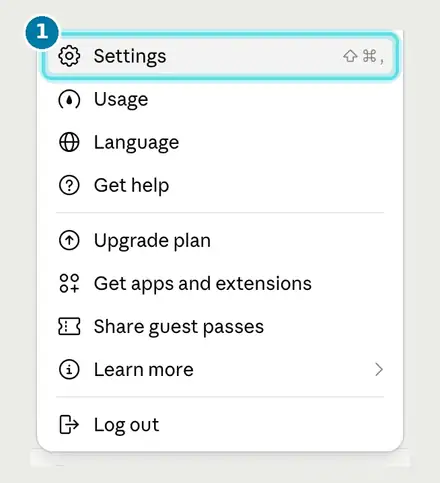
Open Settings
In Claude, click your name at the bottom left of the sidebar, then click Settings.
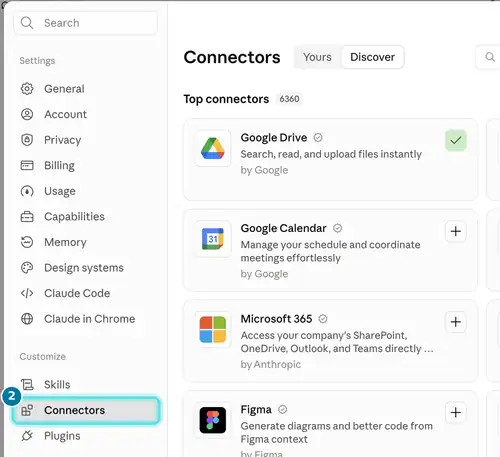
Go to Connectors
In the Settings sidebar, click Connectors.
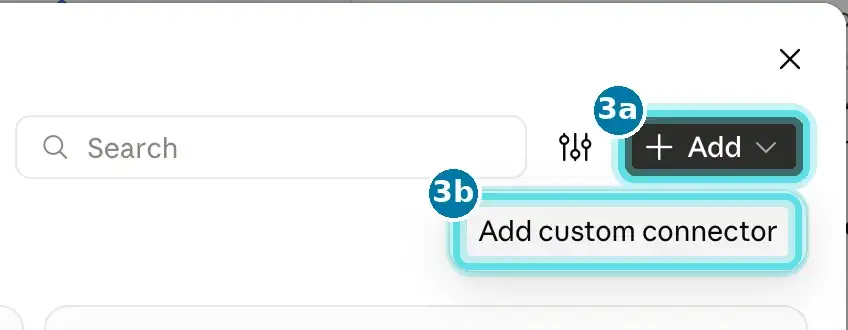
Add a custom connector
3aClick + Add at the top right of the Connectors page. 3bChoose Add custom connector.
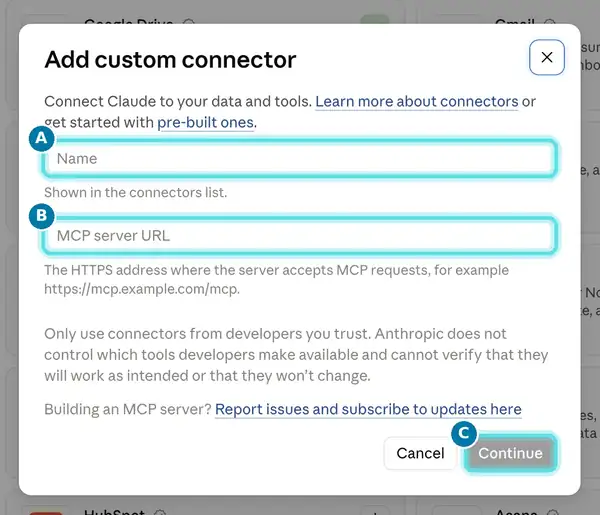
Paste your link
AName: type Motion Turn.
Motion TurnBRemote MCP server URL: paste your private connector link.
Your private link is on your welcome page, in your welcome email and in your dashboard.
CLeave Advanced settings empty and click Continue. If Claude asks you to allow the connector, choose Allow.
Your link works like a password. Share it only with your own team.
Let Claude download your sounds
Your voiceover, UI sounds and music are files on motionturn.com. Claude needs permission to download them while it builds your video.
In Claude, go to Settings, then Capabilities. Make sure code execution and file creation is on, then under network access add motionturn.com to the allowed domains.
motionturn.comOn Claude Team or Enterprise, an admin sets this for the organization. Ask them to add motionturn.com. If it is not allowed, Claude still builds your video and composes the sound in code instead.
Start your first video
Open a new chat. Pick Opus 5.5 or newer in the model menu and set effort to high. Open the tools menu in the message box and check that Motion Turn is switched on. Then send:
Hey Claude, use Motion Turn MCP to make a launch video for my brand.Claude asks a few quick questions on clickable cards, saves your brand profile and builds your video. Next time it starts faster because your brand is saved to your connection.
Common questions
I use Claude Team or Enterprise and cannot add a custom connector.
An owner of your Claude organisation may need to allow custom connectors first, or add Motion Turn for the whole team in the organisation settings. Ask your Claude admin, then follow the steps above.
Claude says it does not have Motion Turn.
Open the tools menu in the chat and switch Motion Turn on, or start a new chat. Check that the connector URL is exactly your link, with nothing added at the end.
Claude asks me to switch models.
Choose Claude Opus 5.5 or newer in the model picker, set effort to high, and send your request again.
Does it work in the Claude mobile app?
Yes. Add the connector once on the web or desktop app, and it is available in the Claude mobile app with the same account.
I lost my link, or someone outside my team has it.
Email info@motionturn.com from the address you signed up with. We send your link again, or replace it if it has been shared.
How many videos do I have left?
Claude tells you at the start of each new video. You can also ask: “How many Motion Turn videos do I have left?” See how a video is counted.
No link yet? Start with 3 free videos, no card needed.
Start free trial